Prostir

Practical guide

How to build a lightweight CRM in Prostir Company

Build a lightweight CRM in Prostir Company around the customer work you actually do. Describe the records, fields and stages in Builder, test the current Company tools and inspect the result through shared views.

Before you read

What gets published

You get a practical record model, pipeline, follow-up rhythm, access boundary, AI-helper plan, and a clear test for when HubSpot or another dedicated CRM is the better choice.

Best for

Small companies that have a clear sales process but still lose follow-ups between spreadsheets, notes, files, and chat.

Where the work happens

Lightweight CRM · Prostir Company · Sales pipeline · HubSpot alternative

01

What this CRM is—and is not

  • Company Preview includes native CRM records for organizations, people, opportunities and interactions, with configurable fields, saved views and supported templates. Describe your sales process in Builder, then inspect the records and stages it prepares. Link customer work with Tasks, Files, Knowledge and authorized AI assistance inside the same private membership. Company Preview is included in Creator and AI Creator Pro; verify specialist marketing, forecasting, service and accounting requirements separately.
02

Model the relationships

  • Create only the records that answer recurring questions. People hold contact details, consent, role, and owner. Organizations hold account context. Opportunities hold value range, stage, next step, expected date, and loss reason. Activities record calls, messages, meetings, and decisions. Use stable links between them rather than copying the same company name into five places. Avoid collecting personal data simply because a CRM could store it.
03

Build a pipeline people can read

  • Build a pipeline view from Opportunities and agree on plain stages such as New, Qualified, Proposal, Decision, Won, and Lost. Every active opportunity needs one owner, one next action, and one date. Tasks and named boards carry the work; the opportunity record carries the commercial state. Goals can track a measurable period without turning every task into a KPI. Review stale records weekly instead of hiding them in an endless backlog.
04

Make follow-up visible

  • Use Tasks for concrete follow-up: call, prepare a proposal, request a decision, or hand over after a win. Add the opportunity link, owner, due date, and completion evidence. Keep notes that affect the relationship in the activity history, not in a private message. Record stage changes and important edits with actor attribution and revisions so the company can reconstruct why a deal moved without treating an AI summary as the source of truth.
05

Keep files and knowledge traceable

  • Keep proposals, meeting notes, requirements, and approved offer material as versioned Files or Documents. Put reusable product facts, qualification rules, objections, and handover instructions in cited Knowledge. A record should link to the exact current material rather than absorb whole documents into free-text fields. That makes a later answer traceable and lets the document owner update one source instead of repairing many copied notes.
06

Add a bounded AI helper

  • Attach an existing Agent when a bounded helper can prepare a meeting brief, find approved answers, summarize recent activity, or draft a follow-up for human review. Company-owned tools and MCP connections can read or update the exact records they are authorized to use; explicit exposure controls what appears in tools/list while every eligible tool remains searchable. Keep sending, pricing exceptions, deletion, and access changes behind explicit confirmation. Autonomous operator execution is still staged and should not be implied.
07

Where HubSpot is different

  • Choose HubSpot or another dedicated CRM when you need mature email capture, marketing automation, attribution, lead scoring, forecasting, service tickets, call tooling, large sales administration, or a broad integration marketplace as a finished product. Choose the Company pattern when the pipeline is small, the process is unusually custom, private knowledge matters as much as the deal table, and the company wants AI helpers beside its shared work. Some companies will use both and connect only the records needed for one job.
08

Pilot before you migrate

  • Pilot with ten to twenty active opportunities for one week. Make every owner update the next action and date, run one pipeline review, and test one read-only AI helper. Count missed follow-ups, duplicate records, time spent preparing meetings, and corrections to AI drafts. Keep the model if people can answer ‘what happens next?’ from one place. Move to a dedicated CRM if administration or marketing requirements dominate the custom workflow.
09

Will my colleagues actually use it?

People need a clear job, familiar language and confidence about what they can check. Introduce one useful task with its actual users, then adjust it from their feedback. Company keeps shared work together; Learning can support practice, homework and feedback while remaining a Preview product.

A Prostir example

Create a Learning course for answering customer questions. Show its modules and lessons, add a practice assignment and review the homework. Use a free booked session when a learner needs a scheduled discussion.

Create a module, preview homework, explore the course graph, schedule and book a session, then add a module with Builder.

What to check first

Watch a colleague complete the task without coaching. Check where they hesitate, whether they can verify the result and who handles exceptions.

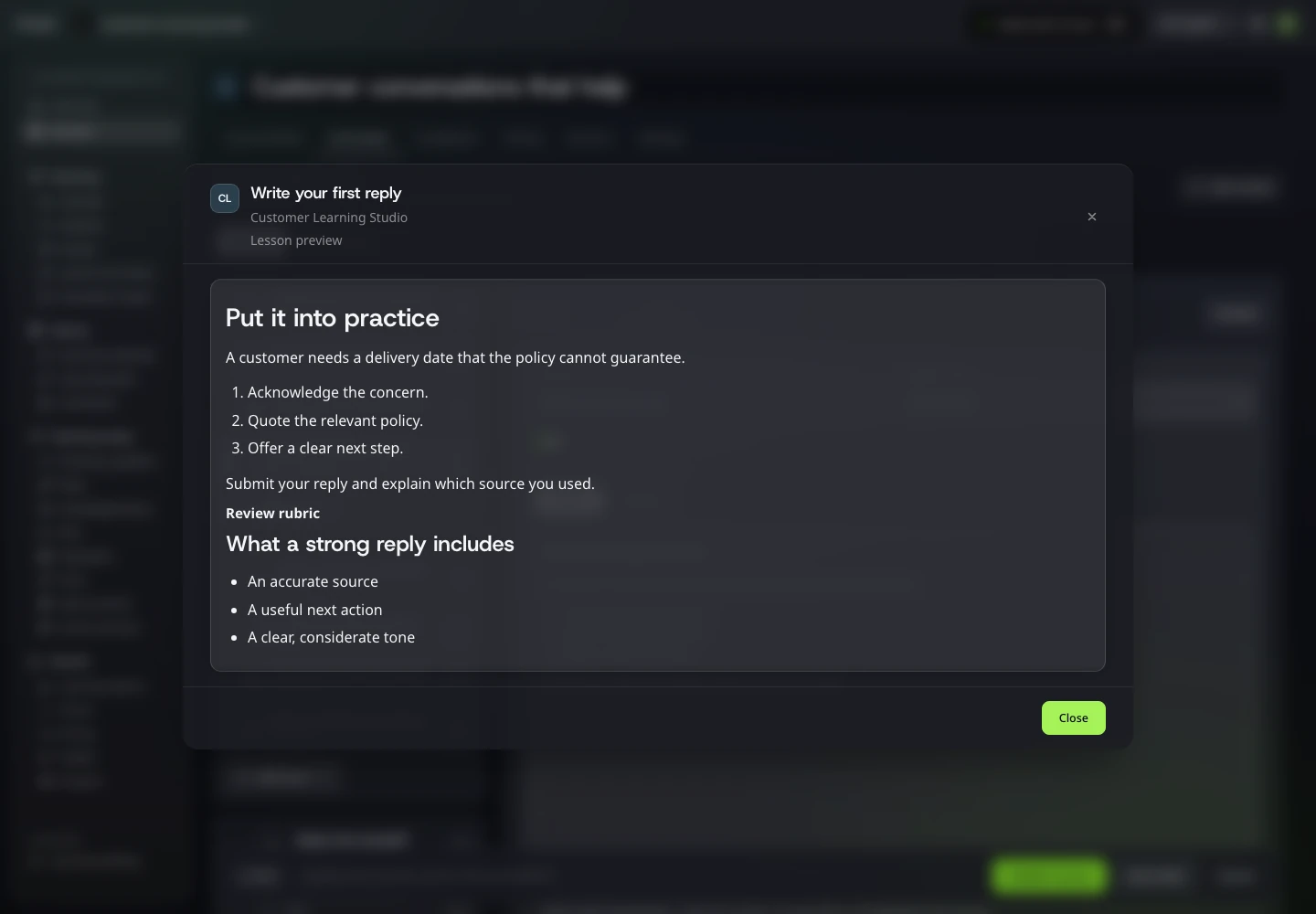
Learning homework preview with the assignment, submission instructions and review criteria
Show learners what to put into practice.

Solutions

AI workspace for companies: your team's work in one place

One private Company where your team and its AI helpers see the same tasks, records, files and knowledge. Each person sees and edits what their role allows, and every change is easy to trace back.

Solutions

Give your team's work one home.

Stop digging through chats to find out what happens next. Set up one board, a few records and your own knowledge in Company Preview. Start your 7-day Creator trial, no card needed. Company Preview is included in Creator and AI Creator Pro.

Image preview