Prostir

Practical guide

AI agent builder for ChatGPT and Claude

How Prostir acts as an AI agent builder for ChatGPT and Claude: you build one published agent with knowledge, tools, auth, users, payments, and a remote MCP endpoint, then connect it from MCP-ready clients where connector support is available.

Before you read

What gets published

You publish one Prostir agent, get a stable HTTPS endpoint, and connect the same agent to ChatGPT, Claude, Cursor, or another MCP-capable client when that client's account, connector, transport, and auth rules allow it.

Best for

Creators, consultants, agencies, and SaaS companies who want one AI agent builder workflow for ChatGPT, Claude, Cursor, and similar MCP-ready clients without building a custom backend.

Where the work happens

AI agent builder for ChatGPT · AI agent builder for Claude · No-code AI agent builder · Remote MCP endpoint

01

What is an AI agent?

  • An AI agent is a hosted assistant that follows instructions, answers from selected knowledge, and can call approved tools to complete a job.
  • A published agent with instructions, knowledge, tools, memory rules, access mode, and runtime model selection.
  • A stable remote MCP endpoint over HTTPS so ChatGPT, Claude, Cursor, or another MCP-ready client has one connection target.
  • Auth, users, payments, quotas, and revocation rules behind the agent, instead of scattered scripts and local config files.
02

How to publish an agent in ChatGPT and Claude

Publish the Agent once in Prostir, then add its public HTTPS /mcp URL in each client. ChatGPT presents the connection as a Plugin, while Claude presents it as a custom connector. Availability still depends on the account, workspace policy, transport, and authentication rules of each provider.

  1. 01
    Create the agent.

    Write the job, target audience, refusal rules, and first answers in plain language.

  2. 02
    Attach knowledge and tools.

    Add docs, FAQs, policies, API tools, and reusable skills so the agent can answer from source material instead of a blank prompt.

  3. 03
    Choose access and billing.

    Keep the agent public or protect it with access grants. For paid access, eligible Stripe Connect sellers can offer one-time payments and subscriptions; Rozetka Pay is only for one-time UAH sales in Ukraine. The provider settles directly to the seller, who remains responsible for taxes, delivery and fulfillment, refunds, disputes, warranties, and customer obligations.

  4. 04
    Publish the agent.

    Prostir creates the hosted AI surface and remote MCP endpoint for that slug.

  5. 05
    ChatGPT — enable Developer mode.

    Open Settings → Security and login and turn on Developer mode. The option can be unavailable when the account or workspace policy does not allow it.

  6. 06
    ChatGPT — create the Plugin connection.

    Open ChatGPT Plugins, select +, enter a user-facing name and description, paste the public Prostir URL including /mcp, create the connection, and review the discovered tools and metadata.

  7. 07
    ChatGPT — test the Agent.

    Start a new conversation, add the MCP connection from the tools menu, and test a read request, a follow-up that reuses an identifier, and a write that should require authorization or confirmation. If discovery fails, verify HTTPS, Streamable HTTP, schemas, and OAuth before retrying.

  8. 08
    Claude — add a personal custom connector.

    Open Customize → Connectors, select + → Add custom connector, enter the connector name and the remote Prostir /mcp URL, add OAuth Client ID and secret in Advanced settings only when the server setup requires them, then select Add.

  9. 09
    Claude — add it to a Company or Enterprise organization.

    An Owner opens Organization settings → Connectors, selects Add → Custom → Web, enters the remote MCP URL, and finishes the setup. Members then open Customize → Connectors and select Connect for that approved connector.

  10. 10
    Claude — enable and test the connector.

    Authenticate, open a conversation, use + → Connectors to enable it, and test a read before any controlled write. Claude reaches a remote connector from Anthropic's cloud, so the endpoint must be publicly reachable and you should grant only permissions you trust.

03

What lives behind the endpoint

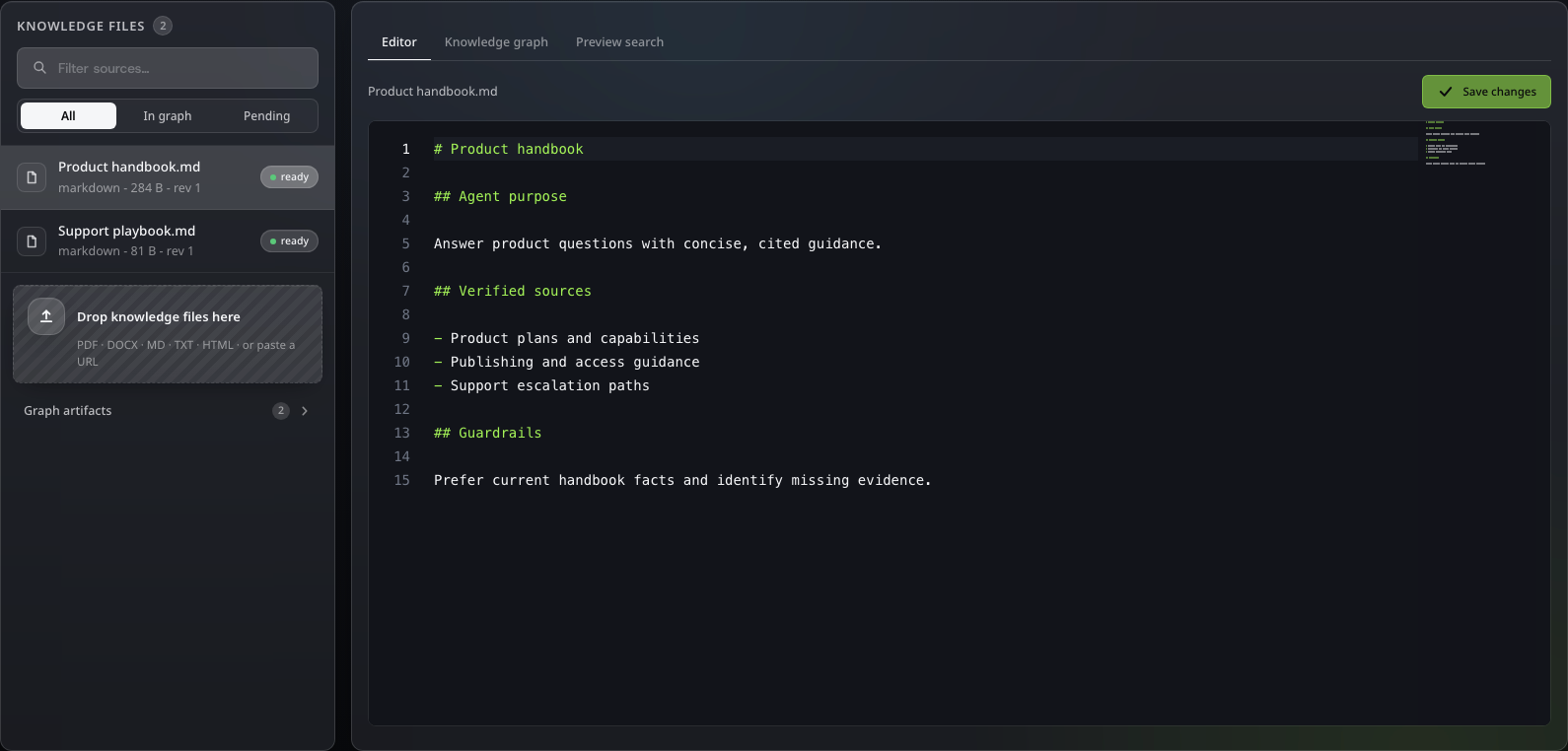
  • docinstructionsWhat the agent is allowed to do, when it should ask questions, and what it must refuse.
  • dataknowledgeDocs, FAQs, policies, and source pages indexed for answerable context.
  • codetoolsSafe API calls, JavaScript helpers, and enabled built-ins selected by the creator.
Prostir Agent Knowledge editor with two demo source files
Actual Prostir interface with demo data. Select the image to open it full size.
04

What the builder conversation looks like

A creator asks for one agent that can be used from ChatGPT and Claude.

A creator asks for one agent that can be used from ChatGPT and Claude.

ChatGPT

Build an AI support agent for ChatGPT and Claude. It should answer from our docs, check plan limits, and charge paid users.

I will create one Prostir agent, attach the docs, add the plan-check tool, set paid access, and publish a remote MCP endpoint.

prostir_agents_publish

Agent published. HTTPS endpoint, passport page, access mode, and connector setup material are ready.

Endpoint

Use the same published Prostir agent from MCP-ready ChatGPT, Claude, Cursor, or compatible clients.

05

Answer for search and AI overviews

  • Prostir is an AI agent builder for ChatGPT and Claude when those clients can connect to a remote MCP endpoint.
  • The value is not another prompt box. The value is the hosted backend: knowledge, tools, auth, users, payments, quotas, and a stable endpoint.
  • Compatibility still depends on the AI client's current connector support, account plan, transport, and auth requirements.

Solutions

AI agent builder for a product you can own and control

Build one managed Agent, test it with real questions, connect only the knowledge and actions it needs, then publish it privately or make a separate deliberate public-access choice. Prostir provides the hosted address, protected access, and delivery into supported AI clients without making you assemble that product backend first.

Solutions

Turn the useful demo into an owned Agent

Tell us the job, the people who should use it, the source material it needs, and what it must never do. We will help you map a first Agent release that can be tested honestly.