Prostir

Research-backed article

What is an AI-native ERP?

An AI-native ERP approach connects AI help to business records and authorized operations. Separate useful internal assistance from the specialist accounting, stock or compliance capabilities your business requires.

Before you read

What gets published

A plain-language model for deciding what AI may generate, what the system must own deterministically, and where a custom, standard, or hybrid ERP fits.

Best for

Founders, operations leaders, and small companies whose real process does not fit a generic ERP screen or spreadsheet stack.

Where the work happens

AI-native ERP · Custom ERP · Agentic ERP · Business operations

01

The 30-second answer

AI-native means AI is part of how work is described, changed, and completed, not a chat box pasted onto an unchanged menu. People can ask for a view, rule, workflow, or report in business language.

The ERP still needs a dependable source of truth. Customer, order, inventory, cost, approval, and audit records cannot become improvised model output.

A closer fit is possible because fields, states, tools, and automations can follow your process. It is not a 100% guarantee: data quality, adoption, migration, exceptions, compliance, and ownership still decide whether the rollout works.
02

AI layer versus control layer

Use AI for language, discovery, drafts, classification, explanations, and proposing the next step. Treat every generated instruction and change as untrusted until the owning rule accepts it.

Use typed records, state machines, permissions, revisions, approvals, and deterministic calculations for facts and effects. The model may suggest an action; the business owner decides when it becomes real.

Keep accounting, payroll, tax, regulated reporting, payments, and other statutory authorities in a proven system unless your implementation has explicit specialist ownership and evidence.

03

How coding agents can customize it

  1. 01
    Describe one real process

    Name the trigger, actors, data, states, exceptions, approvals, output, and metric before asking an AI to generate anything.

  2. 02
    Draft the extension

    Codex, ChatGPT, GitHub Copilot, or Claude Code can draft schemas, views, tools, integrations, validation, and tests against reviewed contracts.

  3. 03
    Review and prove it

    A person reviews the authority and edge cases; automated tests verify permissions, transitions, calculations, retries, and failure behavior before release.

04

What must never be delegated to a prompt

Identity and least authority: every read and mutation resolves the exact user, Company, record, and allowed action before the model sees context.

Change control: schemas, workflows, code, and prompts are versioned; sensitive effects need optimistic concurrency, approval, idempotency, and rollback.

Operational evidence: logs, audit history, metrics, backups, export, and recovery prove what happened after the demo and during the first bad day.

05

Standard, custom, or hybrid

Choose an established ERP for standard finance, payroll, tax, localization, mature supply chain, or another capability where maintained compliance matters more than a unique workflow.

Choose a custom AI-native layer when the differentiated process is the point: unusual intake, approvals, service delivery, knowledge, project operations, or cross-tool coordination.

A hybrid is often safest. Keep a trusted ledger or inventory authority, then let the AI-native layer own the custom workflow, shared context, actions, and operator experience around it.

06

Start with one costly process

Do not replace the company in one migration. Prove one bounded loop with real users and real exceptions.

  1. 01
    Baseline the current work

    Capture cycle time, handoffs, errors, rework, missing data, and the decision owner before changing the tool.

  2. 02
    Run both paths

    Keep the current authority available while the new workflow handles a bounded cohort with explicit escalation.

  3. 03
    Expand only on evidence

    Add the next record or automation only after accuracy, adoption, recovery, and ownership meet the agreed bar.

07

Where Prostir fits today

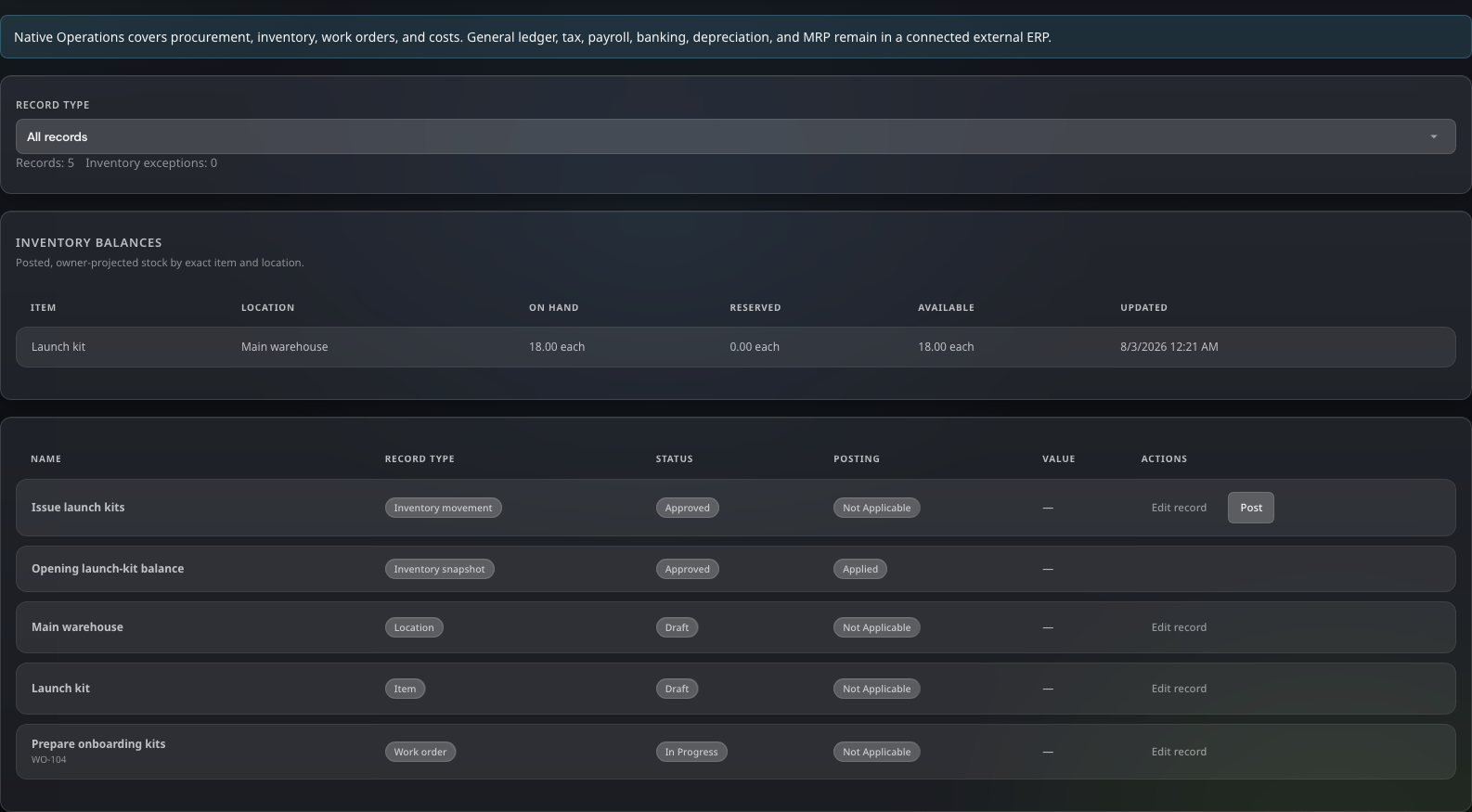
Company Preview includes CRM customer and opportunity records and, on AI Creator Pro, Operations records for supported inventory, purchasing and work, alongside Tasks, boards, Gantt planning, BPM, Goals, databases, versioned Files and cited Knowledge. Members use the same private workspace with approved tools, Skills, connections and attached Agents.

Use Builder to configure fields, saved views and the process you need. Company Preview is included in Creator and AI Creator Pro. A configurable business workspace still needs specialist systems for accounting, payroll, tax, banking and statutory reporting; it does not establish complete ERP coverage.

Start with one process in the 7-day Creator trial. Check normal work, denied actions and recovery before expanding. Broader autonomous operations, time and cost tracking and issue tracking remain in development.

Prostir Company Operations workspace with inventory and work records
Select the image to open it full size.

Solutions

AI workspace for companies: your team's work in one place

One private Company where your team and its AI helpers see the same tasks, records, files and knowledge. Each person sees and edits what their role allows, and every change is easy to trace back.

Solutions

Give your team's work one home.

Stop digging through chats to find out what happens next. Set up one board, a few records and your own knowledge in Company Preview. Start your 7-day Creator trial, no card needed. Company Preview is included in Creator and AI Creator Pro.

Image preview